ASSIGNMENT NO.3
DATA VALIDATION IN EXCEL:
Data validation is a feature that allows you to control the type, format, or range of data that users can input into specific cells. By applying predefined rules, you can ensure that only valid and relevant data is entered into your Excel worksheet.
Create a Data Validation Rule
To create the data validation rule, execute the following steps.
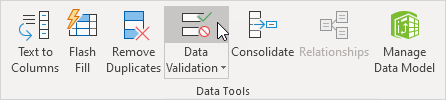
1. On the Data tab, in the Data Tools group, click Data Validation.
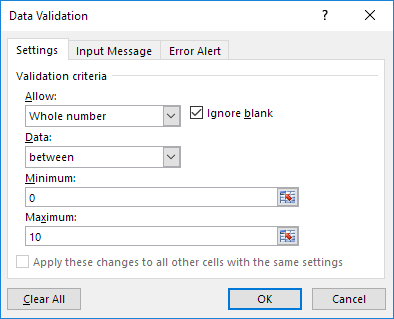
On the Settings tab:
3. In the Allow list, click Whole number.
4. In the Data list, click between.
5. Enter the Minimum and Maximum values.
To create the data validation rule, execute the following steps.
1. On the Data tab, in the Data Tools group, click Data Validation.
On the Settings tab:
3. In the Allow list, click Whole number.
4. In the Data list, click between.
5. Enter the Minimum and Maximum values.
Input Message
An input message appears when the user selects the cell and tells the user what to enter.
On the Input Message tab:
1. Check 'Show input message when cell is selected'.
2. Enter a title.
3. Enter an input message.

An input message appears when the user selects the cell and tells the user what to enter.
On the Input Message tab:
1. Check 'Show input message when cell is selected'.
2. Enter a title.
3. Enter an input message.

Error Alert
If users ignore the input message and enter a number that is not valid, you can show them an error alert.
On the Error Alert tab:
1. Check 'Show error alert after invalid data is entered'.
2. Enter a title.
3. Enter an error message.
4. Click OK.
If users ignore the input message and enter a number that is not valid, you can show them an error alert.
On the Error Alert tab:
1. Check 'Show error alert after invalid data is entered'.
2. Enter a title.
3. Enter an error message.
4. Click OK.
Data Validation Result
Now, let's check if the data validation is working properly and as expected.

Now, let's check if the data validation is working properly and as expected.


Comments
Post a Comment